A practical guide for node runners and validators on the Cosmos ecosystem
Why Syncing Strategy Matters More Than You Think
You’ve picked your server, installed the binary, configured your config.toml — and then you hit the sync. Hours pass. Sometimes days. If you didn't choose the right syncing strategy upfront, you might be sitting on a node that takes 3 days to catch up instead of 3 hours, or worse, one that runs out of disk space mid-way.
In the Cosmos ecosystem (built on CometBFT, formerly Tendermint), syncing isn’t one-size-fits-all. You have real choices — and each one comes with trade-offs around speed, disk usage, trust assumptions, and operational complexity.
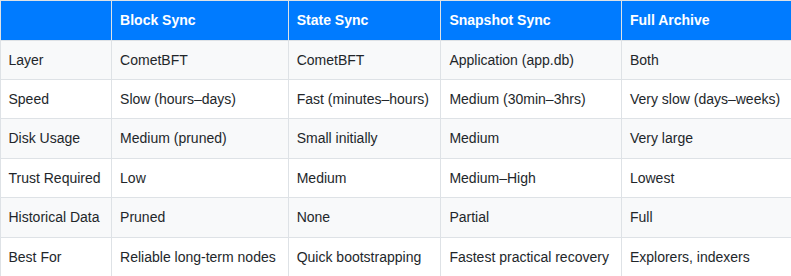
One thing that trips up a lot of node operators: State Sync and Snapshot Sync are not the same thing. They operate at completely different layers of the stack, have different trust models, and suit different situations. This guide breaks down all four strategies clearly so you can make the right call.
The Four Strategies at a Glance
1. Block Sync (formerly Fast Sync)
What It Is
Block Sync is the default sync mode for most Cosmos chains. Your node downloads every block sequentially and re-executes all transactions to rebuild state from scratch. It doesn’t participate in live consensus while syncing — it replays history as fast as peers can serve it, then switches to normal consensus once caught up.
Think of it as building the entire city block by block from the blueprint, verifying every brick yourself.
How It Works
Block Sync is enabled by default in config.toml:
toml
[blocksync]
enable = true
version = "v0"
Your node connects to peers from persistent_peers or seeds, downloads blocks in order, applies transactions, and rebuilds state. Once catching_up flips to false in the status endpoint, you're live.
bash
curl -s localhost:26657/status | jq .result.sync_info.catching_up
Pros
- Low trust assumptions — you verify every block yourself
- Battle-tested and the default on every Cosmos chain
- Clean, fully auditable state from a known starting point
Cons
- Slow on long-lived chains — Cosmos Hub or Osmosis can take 2–5 days depending on hardware
- Speed is capped by peer quality and your I/O throughput
- High disk I/O — replaying millions of transactions is hard on SSDs
When to Use It
Block Sync is your go-to when setting up a long-term validator or sentry node where you want maximum confidence in your state. It’s also the right choice when you’re not time-pressured and want the cleanest node possible.
Tip: Pair Block Sync with pruning = "default" to keep disk usage manageable. Validators don't need full history — just the last 100 states is enough to operate safely.
2. State Sync
What It Is
State Sync is a CometBFT-level feature that lets your node skip replaying history by downloading a verified snapshot of the consensus state at a recent height. It works by fetching a snapshot that peers are serving over the P2P layer, then verifying it against a trusted block hash you provide.
Critically, State Sync happens before the application starts. CometBFT fetches the consensus state (block headers, validator sets, commit signatures), and then the application restores its own state from chunks provided by snapshot-enabled peers.
This is entirely different from Snapshot Sync — State Sync is built into CometBFT itself and uses the P2P network, not external downloads.
How It Works
Configure State Sync in config.toml:
toml
[statesync]
enable = true
# Two RPC endpoints needed for cross-verification
rpc_servers = "https://rpc.cosmos.network:443,https://rpc-cosmoshub.blocksafari.io:443"
# Trusted block height — must be a recent height (within last 1000 blocks ideally)
trust_height = 15000000
trust_hash = "ABC123DEF456789..."
# How long to trust a snapshot (default 168h = 7 days)
trust_period = "168h0m0s"
You can fetch the trust_height and trust_hash from a trusted RPC:
bash
LATEST=$(curl -s https://rpc.cosmos.network/block | jq -r '.result.block.header.height')
TRUST_HEIGHT=$((LATEST - 2000))
TRUST_HASH=$(curl -s "https://rpc.cosmos.network/block?height=$TRUST_HEIGHT" | jq -r '.result.block_id.hash')
echo "trust_height = $TRUST_HEIGHT"
echo "trust_hash = \"$TRUST_HASH\""
Pros
- Fast — syncs in minutes to a couple of hours
- Built into CometBFT — no external tooling needed
- No dependency on third-party download servers
Cons
- Requires peers actively serving snapshots over P2P (not always available)
- Higher trust assumptions — you trust the provided hash and the peers serving chunks
- Can be brittle — if peers drop mid-sync, you restart from scratch
- No historical app data — you cannot query anything before the snapshot height
- app.db state is restored from P2P chunks, which can be slow on some chains
When to Use It
State Sync works well when you need to bootstrap quickly and trusted RPC endpoints with snapshot-serving peers are available. It’s a good option for testnets, non-critical RPC nodes, and situations where peers are reliably serving snapshots.
Tip: After State Sync completes, verify your node is producing and receiving blocks normally before marking it production-ready. Always cross-reference trust_hash from at least two independent sources.
3. Snapshot Sync
What It Is
Snapshot Sync is an application-level strategy that is entirely separate from CometBFT’s State Sync. Instead of using the P2P network, you manually download a compressed database snapshot — typically a .tar.lz4 or .tar.gz archive of the node's data/ directory — from a trusted provider, extract it, and start your node from that point.
The snapshot contains the application state (app.db), block store (blockstore.db), and sometimes the CometBFT state (state.db), all at a specific block height. Your node then only needs to sync the remaining blocks from that snapshot height to the chain tip — a much smaller gap.
This is entirely manual. There’s no CometBFT config toggle for it. You download, extract, and start.
How It Works
bash
# 1. Stop your node
sudo systemctl stop gaiad
# 2. Back up your validator key (never skip this)
cp ~/.gaia/config/priv_validator_key.json ~/priv_validator_key.json.bak
# 3. Reset data directory (keeps config intact)
gaiad tendermint unsafe-reset-all --home ~/.gaia
# 4. Download snapshot from a trusted provider
cd ~/.gaia
wget -O snapshot.tar.lz4 https://snapshots.polkachu.com/snapshots/cosmos/cosmos_31316312.tar.lz4
# 5. Extract snapshot
lz4 -c -d snapshot.tar.lz4 | tar -x -C ~/.gaia/
# 6. Start your node — it will sync only the remaining blocks
sudo systemctl start gaiad
# 7. Monitor sync progress
curl -s localhost:26657/status | jq .result.sync_info
Trusted Snapshot Providers
Several infrastructure providers maintain public snapshots for major Cosmos chains, updated every few hours to daily:
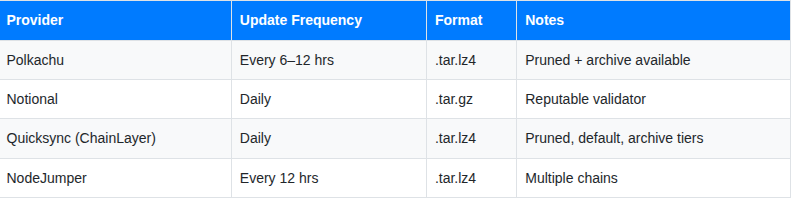
Always download from at least one well-known provider and verify checksums when provided.
Pros
- Fastest practical recovery — download + extract takes 30 minutes to 3 hours depending on snapshot size and your connection
- No dependency on P2P peers serving snapshot chunks
- Works even when State Sync peers are unavailable
- Predictable and repeatable — the snapshot file is static, not streamed from peers
- Partial historical data — depending on the snapshot type (pruned vs archive), you may retain some history
Cons
- Higher trust in the provider — you’re using their database directly
- Snapshot size can be large (10–100+ GB for major chains)
- Bandwidth-heavy — you’re downloading the full database
- Snapshots can go stale — a 12-hour-old snapshot still means 12 hours of Block Sync to catch up
When to Use It
Snapshot Sync is the most practical recovery strategy for most validator operators. It’s what you reach for when a server crashes, when you’re migrating infrastructure, or when you need a new node up fast. It’s faster than Block Sync, more reliable than State Sync (no peer dependencies), and easier to script into your runbooks.
Tip: Build Snapshot Sync into your disaster recovery playbook. Keep a documented list of trusted snapshot URLs for every chain you validate on, and test the recovery process periodically before you actually need it.
4. Full Archive Nodes
What It Is
A full archive node stores every block, every transaction, and every state transition from genesis to the current tip — nothing is pruned. It’s the most complete, most trustworthy, and most resource-intensive option. You can query any transaction or state at any historical block height.
How It Works
Disable pruning entirely in app.toml:
toml
# app.toml
pruning = "nothing"
# Keep all block data
min-retain-blocks = 0
You must sync an archive node via Block Sync from genesis — State Sync and Snapshot Sync won’t give you full history. Many teams use a pruned snapshot to get close, then resync from there, but for true archives you need to replay from genesis.
Hardware Requirements
Archive nodes are storage-hungry. Rough estimates for major chains:
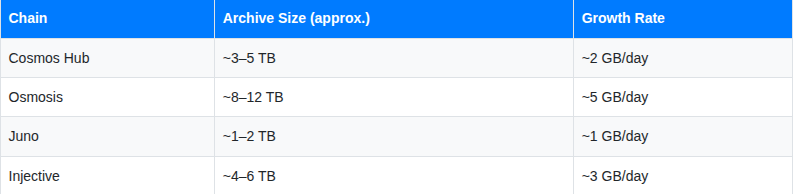
Plan for NVMe SSDs, 32–64 GB RAM, and a high-bandwidth connection (1 Gbps+). These are not cheap nodes to run.
Pros
- Complete historical data — query any block, transaction, or event at any height
- Zero trust assumptions — you verified everything yourself
- Essential for block explorers, analytics platforms, and IBC relayer services
Cons
- Massive and growing disk requirements
- Weeks to sync from genesis on long-lived chains
- Expensive infrastructure costs, especially on cloud
- Not needed for validators — running an archive as your active validator adds unnecessary operational risk
When to Use It
Archive nodes are purpose-built for infrastructure providers, block explorers, analytics platforms, and teams building data pipelines on top of Cosmos chains. If you’re just running a validator, you absolutely don’t need one.
Choosing the Right Strategy
Are you setting up a validator or sentry node?
├── Long-term, reliability is priority → Block Sync (pruned)
├── Need to recover fast after a crash → Snapshot Sync
├── Need up quickly, peers available → State Sync
└── Need to serve full historical data → Full Archive
Are you building RPC infrastructure?
├── Serve recent queries only → Block Sync or Snapshot Sync (pruned)
├── Serve full historical queries → Full Archive
└── Just bootstrap quickly → State Sync or Snapshot Sync
Are you recovering from a node failure?
├── Validator needs to rejoin ASAP → Snapshot Sync (most reliable)
├── State Sync peers available → State Sync (fastest)
└── No rush, want clean state → Block Sync
Practical Tips for Cosmos Node Operators
1. Make Snapshot Sync your DR default State Sync is fast but depends on peers. Snapshot Sync is more reliable under pressure. Keep a tested recovery runbook using Snapshot Sync for every chain you operate.
2. Always set persistent peers before syncing A bad peer list is the #1 reason syncs stall. Use the official chain registry at github.com/cosmos/chain-registry for trusted peer lists.
3. Never skip backing up your priv_validator_key.json Before any sync operation that involves unsafe-reset-all, copy your validator key. Losing it means losing your validator identity.
4. Monitor disk usage during Block Sync Long-lived chains can consume hundreds of GBs during replay. Set up a disk alert before you start — running out of space mid-sync means starting over.
5. Verify snapshot checksums when available Reputable providers like Polkachu publish SHA256 checksums alongside snapshots. Always verify before extracting, especially for validators.
6. For State Sync, cross-reference your trust hash Never use a trust_hash from a single source. Verify it against at least two independent RPC endpoints before starting.
Summary
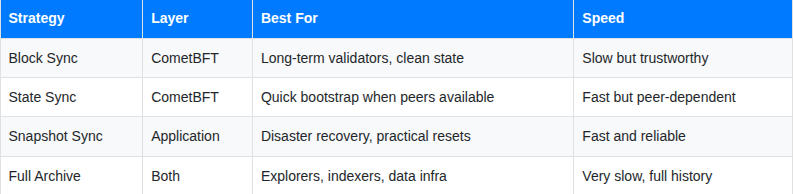
For most validator operators, the answer is: Block Sync for your primary setup, Snapshot Sync for recovery. Keep State Sync in your toolkit for situations where it makes sense, and leave Full Archive nodes to the infrastructure teams building on top of the chain.
Syncing Strategies: Block Sync, State Sync, Snapshot Sync, and Full Archive Nodes on Cosmos was originally published in Vitwit on Medium, where people are continuing the conversation by highlighting and responding to this story.