Running a Cosmos-based validator doesn’t have to be expensive. Here’s how to keep your infrastructure lean on the two most popular cloud platforms.
Why Cosmos Validators Need a Cost Strategy
Cosmos-based chains — Cosmos Hub, Osmosis, Celestia, Injective, and others — are relatively lightweight compared to Ethereum. But “lightweight” doesn’t mean “cheap by default.” Without a deliberate cost strategy, operators end up over-provisioning resources, paying for redundant storage, and running monitoring tools that cost more than they’re worth.
Staking rewards on Cosmos chains typically range from 10–20% APR, which sounds healthy — until you factor in token price volatility and a $100–$200/month server bill. Optimizing your infra costs directly protects your margins in any market condition.
What a Cosmos Validator Actually Needs
Before picking a server, understand the real resource requirements. Most Cosmos chains (using CometBFT/Tendermint consensus) need:
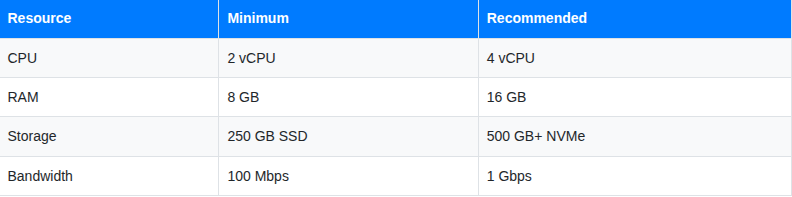
Storage is the one that grows — chain data expands over time, so plan for scalability from day one.
DigitalOcean Strategy
DigitalOcean is the go-to for operators who want simplicity, predictable pricing, and no cloud complexity. Here’s how to run a Cosmos validator efficiently on DO.
Pick the Right Droplet
Always use General Purpose Droplets — never Basic (shared CPU) for validators. Shared CPU causes inconsistent signing performance and missed blocks.
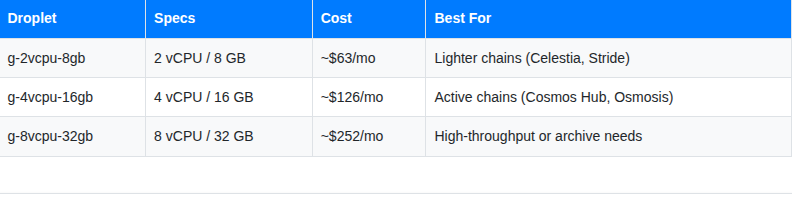
For most Cosmos chains, the $63–$126/month tier is the sweet spot.
Separate Storage with Volumes
Never size up your Droplet just for disk space. Instead, attach a DigitalOcean Volume ($0.10/GB/month) for chain data.
# Format and mount your Volume
sudo mkfs.ext4 /dev/sda
sudo mkdir -p /mnt/cosmos-data
sudo mount /dev/sda /mnt/cosmos-data
# Persist across reboots
echo '/dev/sda /mnt/cosmos-data ext4 defaults,nofail 0 2' | sudo tee -a /etc/fstab
# Point your node to the new data directory
gaiad start --home /mnt/cosmos-data
A 300 GB Volume costs just $30/month — far cheaper than upgrading to a larger Droplet. As the chain grows, resize the Volume without touching the Droplet.
Use Reserved Pricing
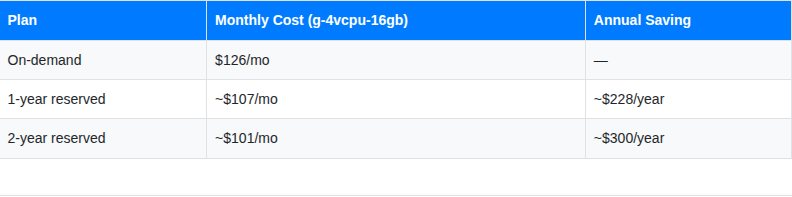
If you’re committed to running for 12+ months, DigitalOcean reserved Droplets save ~15–20%:State Sync Instead of Full Sync
Never sync from block 0. Use state sync to get your node up in minutes instead of days — saving you days of server costs on every new deployment.
# In your config.toml, enable state sync
[stateSync]
enable = true
rpc_servers = "https://rpc.cosmos.network:443,https://rpc2.cosmos.network:443"
trust_height = <recent_height>
trust_hash = "<block_hash>"
Most Cosmos chains have community-maintained state sync endpoints. Check the chain’s official docs or validator community Discord for the latest RPC endpoints.
AWS Strategy
AWS is better suited for operators who need enterprise-grade reliability, multi-region setups, or are already inside the AWS ecosystem. The tradeoff is higher cost — but with the right configuration, you can run a Cosmos validator on AWS without overpaying.
Right-Size Your EC2 Instance
Avoid the temptation to pick a large instance “just to be safe.” For Cosmos validators:
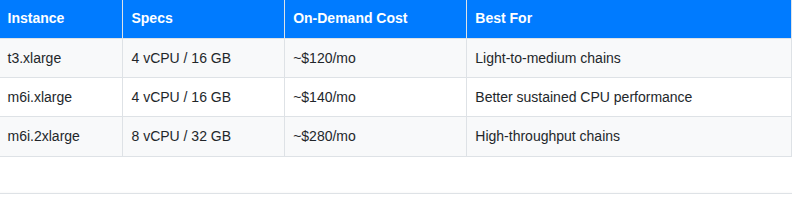
Prefer m6i over t3 for validators — t3 instances use burstable CPU credits, which means performance drops when credits run out. Validators need consistent, not bursty, compute.
Use Savings Plans — Not On-Demand
This is the single biggest cost lever on AWS. Compute Savings Plans offer up to 66% off on-demand pricing in exchange for a 1 or 3-year commitment.
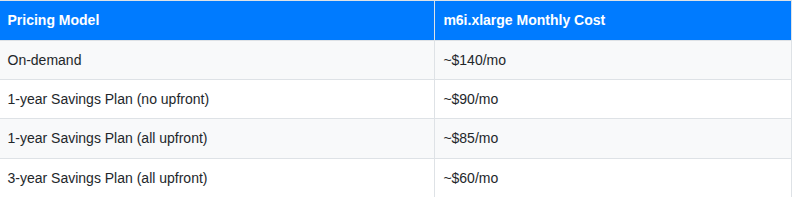
For a long-running Cosmos validator, a 1-year Savings Plan is usually the right call — it nearly halves your compute cost with manageable commitment risk.
Use EBS gp3 Volumes for Storage
Avoid the default gp2 storage — gp3 is 20% cheaper and faster. Always set storage type to gp3 when launching your instance.
# Migrate an existing gp2 volume to gp3 via AWS CLI
aws ec2 modify-volume \
  --volume-id vol-xxxxxxxx \
  --volume-type gp3 \
  --iops 3000 \
  --throughput 125
A 500 GB gp3 volume costs ~$40/month versus ~$50/month for gp2 — same performance, lower cost.
Use Spot Instances for Non-Validator Nodes
Your sentry nodes (public-facing nodes that protect your validator from direct exposure) don’t need to be on-demand instances. AWS Spot Instances can run sentry nodes at 60–70% discount — and if a spot instance gets interrupted, your validator continues signing through the remaining sentries.
# Launch a spot sentry node via AWS CLI
aws ec2 run-instances \
  --instance-type m6i.xlarge \
  --instance-market-options 'MarketType=spot' \
  --image-id ami-xxxxxxxx \
  --key-name your-key
Never run your actual signing validator on a Spot instance — the interruption risk is too high. Spot is perfect for sentry and seed nodes.
Keep Data Transfer Costs Low
AWS charges for outbound data transfer (~$0.09/GB after the free tier). Cosmos validators don’t transfer huge amounts of data, but peer connections add up. Two ways to reduce this:
1. Reduce peer count in config.toml:
max_num_inbound_peers = 20
max_num_outbound_peers = 10
2. Place sentry nodes in the same AWS region as your validator — traffic within the same region is free between instances on a private VPC.
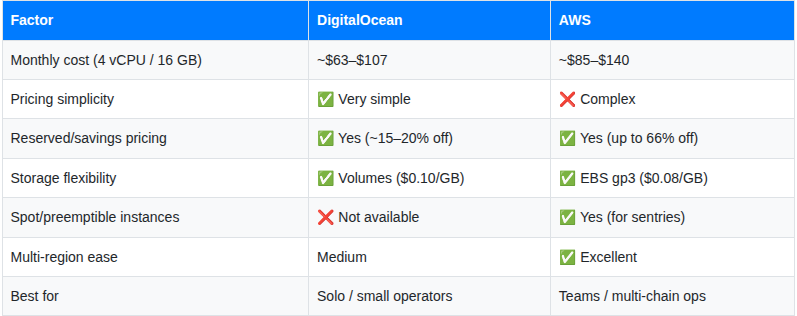
Side-by-Side Comparison: DO vs AWS for Cosmos Validators
Monitoring for Free (Both Platforms)
Regardless of platform, monitoring doesn’t need to cost anything:
- Grafana Cloud free tier — Up to 10,000 metrics series, hosted dashboards, 14-day retention. Perfect for up to 5 validators.
- Telegram bot alerts — Free. Set up via Grafana’s notification channels. Beats paying $20+/month for PagerDuty.
- cosmos-exporter — An open-source Prometheus exporter built specifically for Cosmos chains. Exposes validator rank, missed blocks, delegations, and jailed status.
# Install cosmos-exporter
wget https://github.com/QuokkaStake/cosmos-validators-exporter/releases/latest/download/cosmos-validators-exporter_linux_amd64.tar.gz
tar xvfz cosmos-validators-exporter*.tar.gz
sudo mv cosmos-validators-exporter /usr/local/bin/
Total monitoring cost: $0/month.
Monthly Cost Summary
Here’s a realistic monthly bill for a single Cosmos Hub validator on each platform, fully optimized:
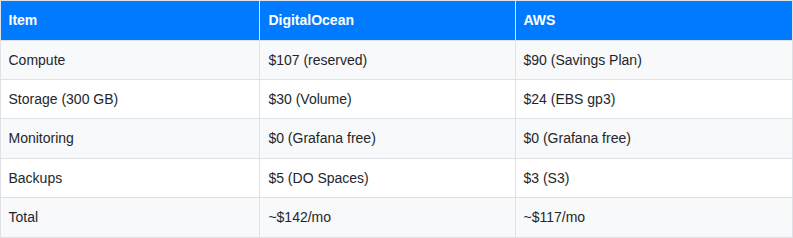
AWS comes out slightly cheaper at scale with Savings Plans, but DigitalOcean wins on simplicity and zero billing surprises.
Key Takeaways
- DigitalOcean: Use General Purpose Droplets + separate Volumes + 1-year reserved pricing. Simple, predictable, great for solo operators.
- AWS: Use m6i instances + gp3 EBS + Compute Savings Plans. Run sentry nodes on Spot for extra savings. Better for multi-chain or team setups.
- Both: Use state sync for fast deployments, cosmos-exporter for free monitoring, and Grafana Cloud’s free tier for dashboards and alerts.
- Biggest universal saving: Never over-provision compute. Resize storage independently as the chain grows.
A well-optimized Cosmos validator setup should cost $100–$150/month on either platform — leaving more of your staking rewards as actual profit.
Cost Optimization Strategies for Cosmos Validators on AWS and DigitalOcean was originally published in Vitwit on Medium, where people are continuing the conversation by highlighting and responding to this story.